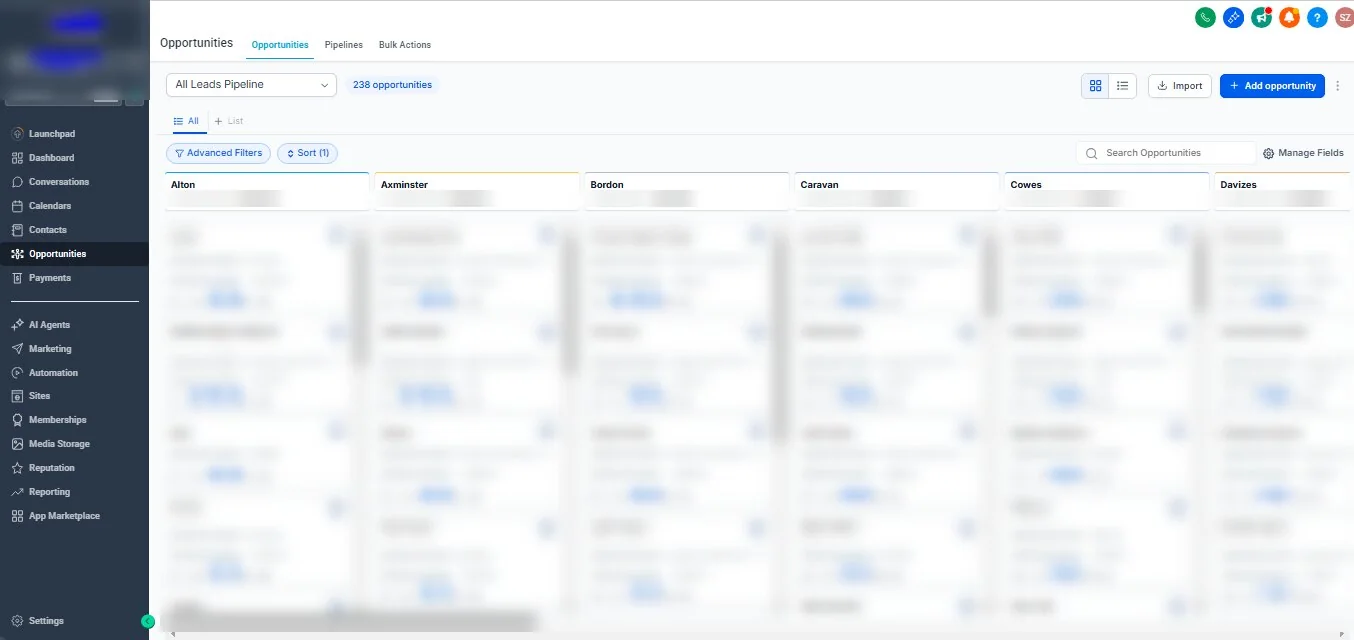
This case study looks at a GoHighLevel sales pipeline we set up for a UK business that serves customers across several towns in southern England. The screenshot below is from the live account. Customer names, deal values and the business’s branding are blurred to protect the client and their customers.
As with all our case studies, we describe what was built and why, rather than quoting performance figures we cannot share.
The brief
The business receives quote requests through its website and by phone, for jobs in different areas. Before the build, requests were spread across inboxes and spreadsheets, and the team found it hard to answer simple questions: how many quotes are open in each area, who is handling each one, and which requests have been waiting too long?
Design decision: stages by location
Most pipelines use stages that describe progress — new, contacted, quoted, won. This one is organised by location instead, with a column for each area the business serves. That was a deliberate choice, because the business runs its sales and scheduling by area. Seeing each location as its own column lets the team spot at a glance where demand is building and where follow-up is falling behind.
Progress is still tracked, just not as columns: tags and the opportunity status record where each quote stands, and filters show, for example, every open quote in one area that has not been contacted.
This is not the right structure for every business. If your team sells the same way everywhere, progress-based stages are usually clearer. Our pipeline management guide explains how to choose.
What every card shows
- An owner. Each opportunity is assigned to a named team member, shown by their initials on the card, so nobody has to ask who is dealing with a customer.
- A source. Cards record where the enquiry came from — the website quote form, an inbound call and so on. Over time this shows which channels bring in real work.
- A value. Each quote carries a value, so the column totals give a realistic picture of what is in the pipeline for each area.
- Activity at a glance. The icons on each card show calls, messages, notes and tasks, so a card that has gone quiet is easy to spot.
How quotes get into the pipeline
Website quote requests create the contact and the opportunity automatically, in the right location column, with the source recorded. Enquiries that arrive by phone are added by the team using the same fields, so every quote looks the same regardless of how it arrived. Consistent data entry is what makes the column totals and filters trustworthy.
Keeping a large pipeline healthy
A pipeline with hundreds of live opportunities only stays useful with some discipline. The practices that matter most:
- One opportunity per job. Repeat enquiries update the existing card instead of creating duplicates.
- Owners on every card. Unassigned opportunities are reviewed and assigned daily.
- Close the loop. Quotes that are won or lost are marked as such, so the open totals stay honest.
- Review stale cards weekly. Anything without activity for a set period gets a follow-up task or is closed.
- Keep the fields simple. A handful of well-used fields beats dozens that nobody fills in. See our custom fields guide.
Lessons for other multi-location businesses
- Organise the pipeline the way the business is managed day to day — by area, by service or by stage — and be consistent.
- Make the source of every enquiry visible from the start; it is very hard to add later.
- Give each opportunity a value, even an estimate, so totals mean something.
- Use filters and tags for progress when the columns are used for something else.
- Protect customer data when sharing screenshots — including internally.
If you run a business across several locations and want your enquiries in one place, get in touch. Our guide to sub-accounts also covers when separate accounts per location make more sense than one shared pipeline.