Sub-Accounts Are the Architecture of Every Profitable GHL Agency
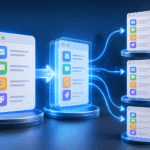
Every client your GoHighLevel agency takes on gets their own sub-account — a fully isolated workspace containing their CRM contacts, automations, funnels, email settings, phone numbers, pipelines, calendars, and reputation management data. Nothing in one sub-account affects any other. This isolation is not just an organizational convenience; it is the architecture that makes agency operations scalable. GoHighLevel’s Unlimited and Agency Pro plans include unlimited sub-accounts at a fixed monthly platform fee, meaning your infrastructure cost remains constant whether you manage 5 clients or 105 clients. Adding client number 50 costs no more in platform fees than client number 5.
Most agency owners underinvest in their sub-account management system during the first year, assuming the default setup will scale with them. It does not. At 5 clients, you can manage everything manually. At 20 clients, you need a clear naming convention and tagging system. At 50 clients, you need standardized Snapshots, documented processes, role-based team access, and a monitoring dashboard that surfaces problems before clients notice them. This guide gives you the framework that works at every stage.
Creating Sub-Accounts the Right Way
Initial Configuration Details
In your Agency Admin panel, navigate to Sub-Accounts and click Create Sub-Account. Enter the client’s legal business name exactly as it appears on their Google Business Profile — consistency between GHL and GBP is required for the reputation management integration to work correctly. Add the full physical address, main business phone number, website URL, and select the most accurate industry vertical from the dropdown. The timezone selection is critical: every scheduled automation, calendar availability window, and business-hours filter in the sub-account operates relative to this timezone. An incorrect timezone setting causes appointment reminders to fire at 2 AM, welcome emails to land at 4 AM, and business-hours restrictions in AI chatbots to engage at the wrong times. Set it correctly before saving.
Deploying Your Niche Snapshot
Immediately after creating the sub-account, deploy your pre-built niche Snapshot. A Snapshot is a packaged configuration containing pipelines, workflow automations, email templates, funnel pages, custom fields, tags, and calendar settings — all configured and tested for a specific industry. A well-maintained dental Snapshot includes appointment confirmation and reminder workflows, treatment plan follow-up sequences, Google review automation, a new patient inquiry pipeline with appropriate stage definitions, and an AI chatbot Knowledge Base pre-filled with common dental questions. Deploying this Snapshot on a new dental client reduces configuration time from 15 to 20 hours to 3 to 4 hours of personalization. Agencies that invest in building 5 to 7 niche Snapshots are able to serve those industries faster and more profitably than any generalist competitor.
Post-Snapshot Personalization
After Snapshot deployment, complete the account-specific configuration tasks: connect the client’s custom email sending domain and verify SPF, DKIM, and DMARC records; purchase a local phone number in the client’s area code through GHL’s Twilio integration and complete A2P 10DLC registration; connect the client’s Google Business Profile for reputation monitoring and review request automation; integrate Stripe or Square for payment processing; and replace all template placeholder text in email sequences, SMS messages, funnel pages, and the AI chatbot Knowledge Base with the client’s actual business name, service descriptions, pricing, and brand voice. Generic placeholder text left in automated messages destroys the client’s trust in the system and reduces response rates significantly.
Organizing Sub-Accounts at Scale
At 20 or more sub-accounts, finding and switching between accounts becomes a real workflow friction point without proper organization. Use GHL’s tagging system to categorize sub-accounts by service tier (Starter, Growth, Pro, Enterprise), by the team member responsible for management, by renewal month for billing tracking, and by account health status (Active, Needs Attention, At-Risk, Churned). Maintain a parallel master spreadsheet or Notion database with: sub-account name and GHL ID, client primary contact name and email, monthly recurring revenue, contract start and renewal dates, any deliverables outside the standard package, and current satisfaction notes. This external reference document becomes indispensable when onboarding new team members and during account reviews.
Use a consistent naming convention across all sub-accounts — Business Name — Niche — Tier is reliable and sortable. Inconsistent naming makes filtering and searching frustrating at scale. Enforce the naming convention from the first sub-account you create so you do not have to rename 40 accounts later.
Team Access and Role Management
As your agency grows beyond solo operation, proper team access setup prevents both security incidents and costly mistakes. GHL supports layered access roles. Agency Admin has full visibility and control over all sub-accounts and agency settings. Account Admin manages a single designated sub-account and cannot see other accounts. Custom roles restrict access by module — your automation specialist accesses workflows and reporting across all assigned accounts; your copywriter accesses only email templates and blog modules; your client accesses only their conversation inbox and reporting dashboard. Never share login credentials between team members. Create individual GHL user accounts for every person and assign them to the specific accounts they manage. This preserves the audit log that records who made which change and when, allows instant access revocation when personnel change, and prevents the recurring nightmare of a departing team member taking shared credentials with them.
Weekly Sub-Account Health Monitoring
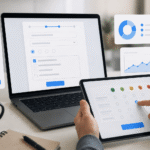
Every Monday, a 20-minute review of the Agency Dashboard catches problems before clients notice them. Look for: sub-accounts with zero workflow executions in 7 or more days (likely a broken trigger requiring investigation), accounts with more than 10 unread conversation messages (leads waiting for responses), accounts showing a significant drop in new contact volume compared to the prior week (possible form, ad integration, or campaign issue), and accounts with a sudden increase in contact unsubscribes or SMS opt-outs (possible messaging or frequency issue). Proactive monitoring at this level is what separates professional agencies from freelancers — and it directly reduces client churn caused by undetected system failures. GHL Nexa manages complete sub-account infrastructure for marketing agencies across 40 countries. Book a free strategy call to discuss scaling your agency operations.
Pro Tips From GHL Nexa Experts
The single biggest mistake agencies make with sub-accounts is treating them as identical containers rather than as customized client environments. Every sub-account should be configured with the client’s specific phone number, email sending domain, business hours, and AI chatbot Knowledge Base populated with their exact services, pricing, and FAQs. The more accurately the system reflects the client’s real business, the better it performs — and the more indispensable it becomes to the client.
When a client account needs to be transferred to another agency or handed back to the client, GHL’s sub-account export and transfer function allows a clean handover without data loss. Document this process in your agency’s offboarding SOP so it can be executed smoothly if needed, rather than improvised under pressure.
Version control your Snapshots quarterly. Each time you discover a new automation sequence that significantly improves client results, update the relevant Snapshot. Over 12 to 18 months, a well-maintained Snapshot library becomes one of your agency’s most valuable assets — a competitive moat that new agencies cannot replicate quickly because it contains hundreds of hours of optimization and real-world testing.
For a free sub-account audit and Snapshot review, GHL Nexa has implemented GoHighLevel systems for over 400 businesses across 40 countries. Book a free strategy call to discuss your specific setup and get a custom implementation plan.